· julianalimin · Computer Stuff · 1 min read
Disable Autoplay of Audio CDs and USB Drives
I find it very annoying when I go home from work and plug my laptop into my external hard drive… The autoplay window always pops up and asks me what I want to do with the files, which may be fine the first time, but definitely isn’t after a year of that. Beside that, virus can be “play” with automatically when we plug in our drives.
Ok now, first go to Group Policy setting, go to Start Menu \ Run and type in:
gpedit.msc
You will see the Group Policy window. You should select Administrative Templates \ System in the tree view:
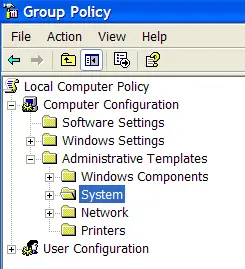
You will see an item in the right side pane called “Turn off Autoplay”


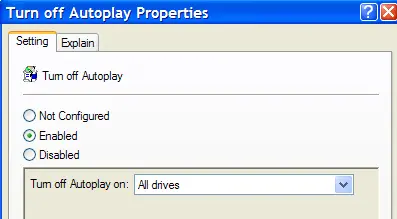
Double click the item, and set the radio button to Enabled, and change the “Turn off Autoplay on” to All Drives.

Now you should be safe from the autoplay monster.